Redwing Blackbird Painting: brush & tablet settings

Visit my Deviant Art: http://the-night-owless.deviantart.com/
I really wanted to post it here, but unfortunately, it’s a large file and I need people to see it up close. Wish I didn’t have to rely on d.a. so much…
(Source: marychapp.com)
Wacom Tablet Driver Problems (Win 7)
This coincides with my previous post: http://www.marychapp.com/post/6124573933/marychapp-digitalpainting-redwingblackbird
Before you begin painting, make sure your tools are working properly.
Apparently, the last driver update that Wacom dished out for their tablets has some major bugs in it. Some people reported that they saw no difference; others like myself weren’t so lucky. There’s a bout of bad pressure sensitivity in Photoshop with Driver 6.1.6-7 for USB Tablets on Windows 7, Vista or XP (32 & 64 bit). I’m not sure if it affects Mac OS X. Below is an example of what would happen (keep in mind that I was applying the same amount of pressure with each stroke):

The plague is undiscriminating; it affects a variety of tablets from Intuos to Bamboo and even Cintiq. There are several driver updates, all of which contain some sort of weird bug. The good news is that previous drivers fix the pressure sensitivity problem, but you might lose the animated brush window feature (circled in red) for the special CS5 brushes. At times, it just randomly disappears only to reappear later on:

I haven’t experienced any other problems, but that doesn’t mean they aren’t there. If you can tolerate this, then it’s worth it compared to dealing with the unpredictable sensitivity flaws. Here’s a forum post that I found in Wacom Community that highlights some of the issues other people were having:
http://community.wacom.com/forums/illustration/hardware-software/thread/583?page=1
I suggest, trying out each driver update that Wacom provides. Sounds weird, but everyone had different results.
If you experience this problem, go here to download the tablet drivers: http://www.wacom.com/en/CustomerCare/Drivers.aspx?model=Intuos3&os=Windows+7
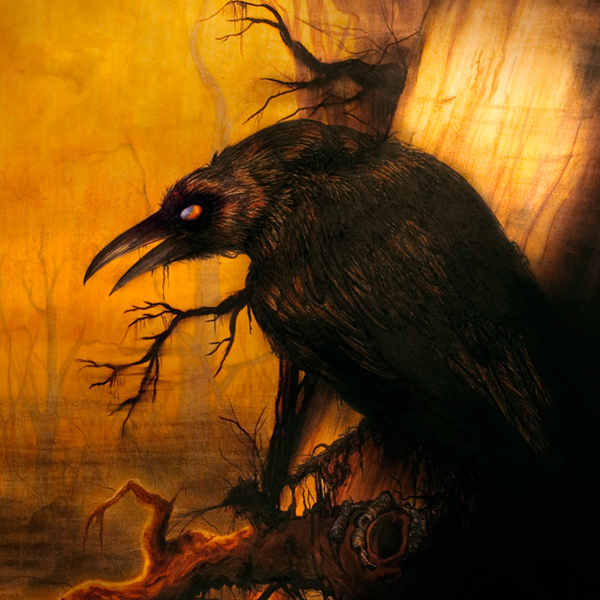
Redwing Blackbird - Digital Painting Study
My DeviantArt: http://the-night-owless.deviantart.com/ <—- larger image available there for closer detail

Well, it’s finally starting to “click” with this digital painting stuff.
Before beginning any original pieces, I’m taking the time to study the basic fundamentals of painting: light and shadow, color theory and various textures. I’ll probably study fur next. Then afterward switch to scenery and architecture. People and skin are last for sure unless if I grow impatient and take another stab at it. I paint hair very well, but when it comes to skin, I either make it look porcelain smooth or extremely pasty, like cake frosting. Both of these are taboos, but you’d be surprised how many people still make these mistakes.
It’s really hard to explain how my brain works. When I’m drawing digitally versus traditionally it’s a whole different process. It’s almost like I can’t transfer my knowledge from one realm to the other. Before I got Photoshop CS5 I used to struggle for hours on end. It’s a matter of manipulating the tools to act in a realistic manner without you having to THINK about what you are doing.
One example is that I would layer colors on top of one another like you would in oil painting. Only thing is I’d find myself at the brush options panel every few seconds making adjustments for different strokes. They just didn’t blend naturally at all. Having to adjust opacity levels and brush tip settings became so time consuming that it affected the natural flow of my painting. The whole painting process turned into this exhausting task. Any tool should feel natural. It shouldn’t work against you.

This might not be the case for everyone, but CS5 really cleared up a number of problems for me. It’s still early in the game, but I already see a difference. The special brushes that they provide with a small animated image (circled in red) are extremely helpful; I can see which angle the brush is tilting at. There’s also a special Mixer Brush tool that blends the colors together instead of relying on the smudge tool. I still make adjustments to my brush and opacity presets, but it’s not quite as often as it used to be. As of right now, I am confined to just switching between three brushes at most. It used to be that I was working with several, if not more.
As of yet, I have not experimented with Corel Painter or SAI although many people claim they are just as good as Photoshop; depends on your preference. I’m interested in trying them all out if possible.
Notes:
There are some important things to know about the latest driver updates concerning Wacom tablets for Windows 7 (64-bit) and Photoshop CS5. I will post this on a separate blog with links to a forum that I found especially useful.
I do intend to make tutorials in the future, but this painting was for practice. I am still getting comfortable with my techniques. However, I have notes on my brush and tablet settings which I will also upload along with my WIP files.
Reference:
http://upload.wikimedia.org/wikipedia/commons/d/d5/Agelaius_phoeniceus_PP.jpg
My DeviantArt: http://the-night-owless.deviantart.com/ <—- larger image available there for closer detail
(Source: marychapp.com)
Inactivity
At the moment, I’m preparing for some portfolio reviews. Combined with homework, I’ve been too busy to update anything. School ends in early May so once that is done and over with, I’m going to be updating a lot more often (preferably once a week). I have some projects that I’d like to see come to full fruition as well as some tutorials and blog reviews (similar to the one I did on Ayami Kojima’s artbook).
Stay tuned! :)
Santa Lilio Sangre - Ayami Kojima artworks

If there was any artist I’d say that had the biggest influence on me, it’d be Ayami Kojima. I still remember being ten years old and going to the video store to rent a game and seeing Castlevania: Symphony of the Night on the shelf. That was how I was first introduced to her, although I wouldn’t learn the identity of the artist until years later.
The art alone drove me to become a cult follower of the franchise. Of course, the game itself is spectacular. Cheesy at times, yes (opening scene with Richter Belmont facing off against Dracula - the English voice acting is so bad, it’s great) but aside from the minor flaws, it echoes a hauntingly majestic zeal, one that I think wouldn’t be possible without Kojima’s personal touch.

For years, I’ve been collecting uploaded scans of her work to quench my obsessions (if anything, it just fueled it) in the hopes that she’d publish an art book of sorts. I’ve ran across a few small collections, all from Japanese magazines like Color Kingdom (vol. 3) which included tutorials, interviews, and some featured works.
I was very happy to have a tutorial with step-by-step images of how she applies her techniques, but sometimes you still need those little written details. Problem is, it’s all in Japanese, and while I could decipher a few things, it didn’t make much of a difference; I can’t read kanji… :(
Most other times, I just didn’t have access to them because she mostly does artwork for very obscure doujinshi and manga (Japanese comic books, graphic novels, etc).
It’s really frustrating, actually and that’s why it’s almost too good to be true that she released such a wonderful collection all packaged up in one book.

In my attempts to find more scanlations, I found an underground forum for Castlevania fanatics and they were raving about the exact thing I had been hoping for.
There is a million things I could say about this art book and most of it wouldn’t make sense because I’d sound like a raving lunatic. I think the art speaks for itself; no amount of fancy vocabulary could really do it justice.

To spare you, I’ll just say this: it’s a very beautiful collection. It not only met my expectations, but it surpassed them with flying colors. Kojima’s work is all done with traditional media using a combination of acrylics, gauche, conté crayon, and sometimes watercolor and copic marker. Her style is not only mesmerizing, but it reflects the exact mysterious Gothic aura that I try to portray in my own work.

Granted, it doesn’t have everything, but seeing as about half of the contents included artwork I’d never seen before, that’s saying something. It’s hard cover (something I didn’t expect) and includes 200 pages of artwork save for three pages in the back that are dedicated to a short interview with the artist herself and a listing of her works/medium/release date information. The images in the book are vibrant and absolutely gorgeous. Mind you, it does come at a hefty price seeing as it’s from Japan, but if you’re someone who is as obsessed with her work (or with Castlevania) as I am, or even if you just appreciate art in general, it’s definitely worth it!
I’ve included a few photos of some of my favorite pieces. I tried to pick ones that people don’t normally show in the forums. I realize that there’s some glare and the photos are taken at odd angles (I tried my best, but I don’t have the heart to scan them and ruin the book). Actually, I feel that it’s better this way because I believe in supporting art and their creators.
That’s why you’ll just have to buy it if you want to see more ;)
(Source: marychapp.com)
Research
Well, I found another batch of good resources while I was laboring over this digital painting business. You can find them in my favorites here: http://the-night-owless.deviantart.com/favourites/ if anyone is interested.
Still conducting research and asking around.
HELP! Digital Painting Tutorials A MUST!
Frankly, I’m at my wit’s end with digital painting… *To clarify this, I am NOT a beginner at drawing or using Adobe products such as Photoshop*
I want to achieve the skills that rival artists like fellow deviants http://nathie.deviantart.com/
Yes, there’s some suggestive content in Nathie’s gallery, but PLEASE! this is not the focus of my findings. I’m looking at the techniques behind the drawing/painting!! Viewer, ye be warned…turn your censoring filters on.
Also, this particular example has no mature content: http://nathie.deviantart.com/gallery/?8631161#/d207vnm
I also am deeply impressed by concept artist and illustrator Gary Tonge: http://www.vision-afar.com/index.php?page=Illustration and so many others…
Look, it may seem ambitious, but it’s what I want most.
I’ve been doing a lot of thinking lately about who I am and what I want. It seems that all along I knew what I wanted. Sometimes I can honestly say I was afraid; other times I was trying to look at the bigger picture, exploring my options. I don’t regret this.
No one on here can really know because all I’ve ever posted is drawings (on deviantart). In real life, I am going to school for graphic design. My entire portfolio is nothing but designs and concepts of logos, website interfaces, photography, posters, and packaging.
But I know that what I love most is drawing. I love creating scenes, characters, and comic book concepts. Bottom line; illustration is my passion. I know if I were in the right mind set, had enough self-confidence, and inspiration, I could do it; I’ve done it before, certainly I can do it again.
I’m jealous, inspired, and awe-struck all at once by these amazing digital artists. I come from a background of all traditional. I want more than anything to branch out to digital painting and be GOOD at it.
Yes, I’ve done thorough searches online for some time now on “How To’s”;
a select few artists on here, such as http://foxbane.deviantart.com/ of which I am eternally indebted and grateful to, have also given their time to graciously teach me their techniques and short cuts. I know I am making a slight progression in my skills, but I toil for days to weeks on ONE painting…it’s honestly pathetic when these other artists around here can knock one out in little under 10 hours! Traditionally, I can get a drawing done within a few days if I have the time available for it, so for me, this is killer!
I honestly NEED HELP! I learn the best with hands-on experience; face to face. For this reason, I hate the internet. Only so much can be communicated via email, forum posts, etc. A person cannot possibly show you everything over the internet without the use of webcam and sharing screens. Live stream would be even nice, but this is honestly asking for a miracle! The people I idolize are far too busy to do this at my beck and call. I know that for now I cannot meet anyone in person to show me the ropes (because I don’t know anyone in real life), but honestly I am in search of the next best thing…
I NEED tutorials that are in depth and above beginner’s level. I took the liberty of posting links so that maybe someone else might benefit from my findings thus far, but my search continues…
I struggle with realism and semi-realistic painting styles. My prime goal is to paint in the style(s) of Neoclassicism, Romanticism, and Baroque, etc.
Here’s some famous examples:
http://skepticlawyer.com.au/files/2010/02/Judith_Beheading_Holofernes_by_Caravaggio.jpg
http://www.oel-bild.de/images/napoleon2g.jpg
The styles, though they may be different are in the realm of realism and just to be able to paint something CLOSE to any of this, I’d be turning over in my grave with ecstasy (sometimes, I am in fact dead to the world…)
Most tutorials I run across fail in these categories:
1. They assume that the painter is a newbie to photoshop and drawing in general. So they explain EVERY SINGLE step in locating a tool!
—— OR ——
They just skim over a technique entirely, being so bloody vague, I am left to aimlessly attempt a series of trial and error techniques. In the end I am just tearing off my eye sockets from the frustration.
2. The artist will show you their brushes, even supply you with them in a downloadable file, (Which I’m so grateful for) but they fail at showing you how they use them in a technique! This means that they oftentimes use a brush on an open canvas to display its effects.
Then they say, “I used THIS brush for THIS painting!” ——- well…that’s nice..but what part?! Where?! How?!?! There’s things called opacity and hardness levels involved…there’s brush presets and layer effects!!! *spams keyboard with frustration*
3. In some cases, their tutorials are outdated and the artist themselves have abandoned them altogether. Understandable; we are always changing.
4. Other times the artist is just plain fucking stingy and will not share their techniques. PERIOD.
5. Probably the biggest pet peeve of mine when it comes to this subject: people upload videos stating “Tutorial” and “How-To” in their titles and it ends up being a damn SPEED PAINTING!!! This is USELESS! Just in general, people seem to upload more speed painting videos than anything else! It’s fun and inspiring to watch, but seriously…?!
One particular person I found on Youtube, who goes by the name architectus777 has hit close to home in suiting my needs. He actually took the time to teach how he paints. Only problem is his video sessions are very long (I think there’s over 14 parts to it and much of it is regurgitated information; otherwise I wouldn’t care if they were 16 hour sessions…)
He did though, explain how he lays down the foundations of colors and what brushes he uses; the video demonstrates him doing this: http://www.youtube.com/watch?v=abgTcIcsRMQ
I have a small amount of tutorials in my arsenal that I find to be the most helpful. Here’s two particular ones from Dianae and Foxbane (fellow deviants) I refer to most often:
http://foxbane.deviantart.com/gallery/#/d1nqe00
http://dianae.deviantart.com/#/d18c4gp
Either I am insanely retarded at following directions and I’m not initiating the technique correctly, or tutorials out there just SUCK!!! (Not that these particular tutorials do; I’m talking in general)
Maybe I just haven’t found enough adequate resources yet…maybe I’m not looking in the right places….
Please…to anyone who watches and takes the time to read my journals/blog posts, if you spot something that might be of some help, send me a note/link. Even if you find a really kick ass artist like the ones I used as examples above PLEASE!!!! LET ME KNOW!!!!
I’m going crazy. T_T
Tamron 200mm Lens

The wheel and picket fence prop. I was fortunate enough to have a Robin land on the fence as I shot. <3
~~~~~~~~~~~~~~~~~~~~~~~~~~~~~~~~~~~~~~~~~~~~~~~~~~~~~~~~~~~~~
Recently I got a job as a photographer’s assistant. Crazy how it happened: called the photographer who had done my senior pictures for advice on a wedding I was asked to shoot. Well, the wedding flopped, but I got a job out of it so I guess it wasn’t a total loss after all. :)
The job isn’t a steady pay, but considering that I’ve been unemployed for about six months, this is more than I could ask for to tide me over with. Not only am I getting paid, but the work is sheer joy.
My boss is nice and funny; she understands creativity. We get along great. Definitely a plus!
I’m the secondary camera in the outfit. Most of what I do is on outings, I get perspective shots and candids of the subjects. My boss uses Canon whereas I use Nikon. Some people strictly live by one or the other. I suppose thirty years ago, there was a major difference between the two (maybe there still is…) but most times it seems like it’s a preference people have.
I’ve heard Nikon has better glass, but maybe it’s different nowadays. I’ve always been a firm believer that it’s the artist, not the tool.
It only took me about 10 minutes to grasp the menu set up, but her Canon equipment is beastin’. I have to check on the specs. She has several and I’ve used 300mm to wide angle and macro, so I forget which one she had me use.
~~~~~~~~~~~~~~~~~~~~~~~~~~~~~~~~~~~~~~~~~~~~~~~~~~

Tool shed with some vines growing on the side.
~~~~~~~~~~~~~~~~~~~~~~~~~~~~~~~~~~~~~~~~~~~~~~~~~~~~~~~~~~~~~~
Anyways, I received a used Tamron 200mm lens to go along with my equipment. I only have a 55mm lens that came with the body. My boss always looks for deals so this came as a pleasant surprise. I’m not entirely familiar with Tamron branded lens. The only ones I’ve ever heard about are Sigma. Now I have used Sigma lenses. My uncle does a lot of bird photography and he reported that he has not had any issues with them. His photography is envy-worthy.
Check out his site: http://jerryjourdan.blogspot.com/
Again, I’m not sure, but according to one of my sources (he used to be a wedding photographer and is pretty knowledgeable with the specs on cameras) Sigma has cheaper made hardware. It’s a smaller company owned by Nikon that sells lenses at lower prices. Also has to do with the ‘grey market’ everyone warns me about. For instance, the gears on the inside are made of plastic.
Now no one is dumb enough (let’s hope not) to think they can drop a camera without facing serious consequences, but considering that Canon and Nikon have such a good reputation, I considered this notion.
~~~~~~~~~~~~~~~~~~~~~~~~~~~~~~~~~~~~~~~~~~~~~~~~~~

Gazebo by the pond. Also another favorite of mine.
~~~~~~~~~~~~~~~~~~~~~~~~~~~~~~~~~~~~~~~~~~~~~~~~~~~~~~~~~~~~~
So far it seems to be working out great. I love the long focal length on it. It’s improved my photography tenfold.
Only things I do not like are the lack of vibration reduction and the fact that it uses manual focus. For instance, shooting birds — this could be a problem…
Once I got the lens, I spent an hour or so outside practicing with it. Another strange thing I noticed is that it has an aperture ring dial located on the lens. For some reason I can only have it on 22 (The range is from 3.8 to 22). Anything other than 22 aperture setting, the menu on my Nikon locks up and refuses to let me shoot. If anyone knows why, please let me know. I’m still new to photography, but I’m not so newbish that I set it on auto and click away. I do know what aperture, shutter speed, ISO, and bracketing are if that gives you an idea.
~~~~~~~~~~~~~~~~~~~~~~~~~~~~~~~~~~~~~~~~~~~~~~~~~~
The photos I uploaded throughout are what I shot using the Tamron lens attached to my Nikon D60 in my boss’ backyard. Sorry for the heavy watermarking; too much art theft going on. Can’t take the risk. Still, I hope you enjoy it all the same. Constructive and thoughtful critiques are always welcome. Thanks! :D

Since my boss owns her own business, she has a lot of props set up in her backyard. This was one of my favorites. I uploaded three different shots of this from different angles.

One of the first photos I took. A swing looking out to the fields beyond the fence. I loved the lighting and the perspective.

Same shot, but without the bird. Slightly zoomed in more too.
~~~
I’ve submitted a few on my deviant art account too: www.the-night-owless.deviantart.com